الدليل 4 من 6 · 6 خطوات
Pocket mode and bike info on RabiDash BM Lite
Pocket mode keeps the mirrored app on the bike's display while the phone is in your pocket. Bike info puts fuel, distance and other numbers from your bike next to Android Auto. How to turn them on, and the limits of this beta.
When to use pocket mode
When you mirror an app, the picture on the bike stops if the phone turns its screen off. Pocket mode keeps the app running on the bike, dims the phone and locks its touch screen, and turns the screen off while the phone is in your pocket. Android Auto keeps running when the phone is locked, so it doesn't need this mode.
Turn on pocket mode
There are three ways. On Home while mirroring, tap Pocket mode. Or tap the Pocket button, the round button floating over the mirrored app (you can drag it along the screen edge). Or let the app do it: Auto pocket mode turns the screen off when the phone goes into your pocket. The Pocket button and Auto pocket mode are both on by default, and you can turn them off in Settings › Display. Both need the Show over other apps permission.
Leave pocket mode
Swipe up on the phone screen to unlock, then choose Exit pocket mode, or Stay in pocket mode if you touched it by mistake.
Turn on bike info beside Android Auto
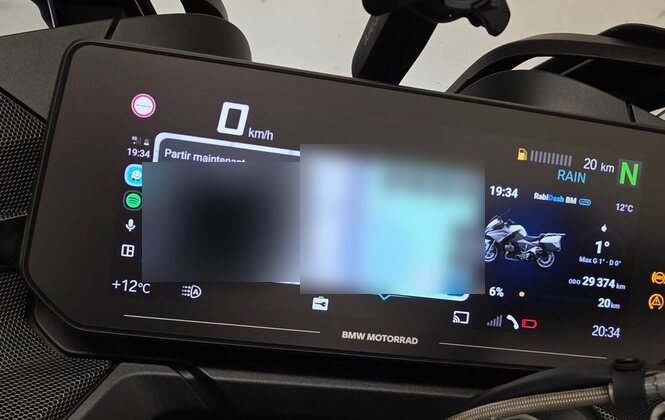
From version 0.1.8, Lite puts a panel of bike info next to Android Auto or next to the mirrored app. The panel is off by default. To turn it on: hold tilt left to open the Lite menu, turn to Info, tilt right. Info only appears when the display is using its full width and the bike has sent its numbers during this ride.
What the panel shows
The panel shows the time, fuel level, ODO, Trip 1 and the distance to the next service. Tyre pressure, remaining range, outside temperature and lean angle show when the bike sends them. Older figures are dimmed with how many minutes ago. Units follow your phone's region settings.
Limits of this beta
With the bike parked, it only sends fuel level, ODO, Trip 1 and the distance to the next service; tyre pressure, remaining range, outside temperature and lean angle may not show. If the bike sends no numbers, the panel doesn't appear and the display stays as it was.
The side screen (the small part of the display next to the bike's own menu) also takes tyre pressure, fuel and range from the bike. Choose what it shows in Settings, under When the bike's menu is open: Auto, Info, Mirrored app or Music.